Track, measure, and maximize brand reach in AI with LLM Visibility

Search Atlas Site Explorer

Site Explorer delivers keywords, traffic, backlinks, AI Overviews keywords, Domain Power, Topical Dominance, Brand Signals, LLM Visibility, Holistic SEO Pillars, and more for any website or page.

Skip the estimates. Site Explorer shows how websites rank, grow, and dominate SERPs and LLM visibility with verified data that reflects how search really works.

Bruce Beck

Bruce Beck

@Marketing720

Source: Search Atlas reviews

Search Atlas has quickly become one of our go-to tools for SEO strategy, content development, and competitor analysis. It’s clear that a tremendous amount of thought and innovation has gone into building what I consider a truly next-generation SEO solution.

500 Million

Indexed Domains

200+

Countries Covered

100 Trillion

Backlinks Tracked

2 Billion+

AI Brand Mentions

What Is Site Explorer?

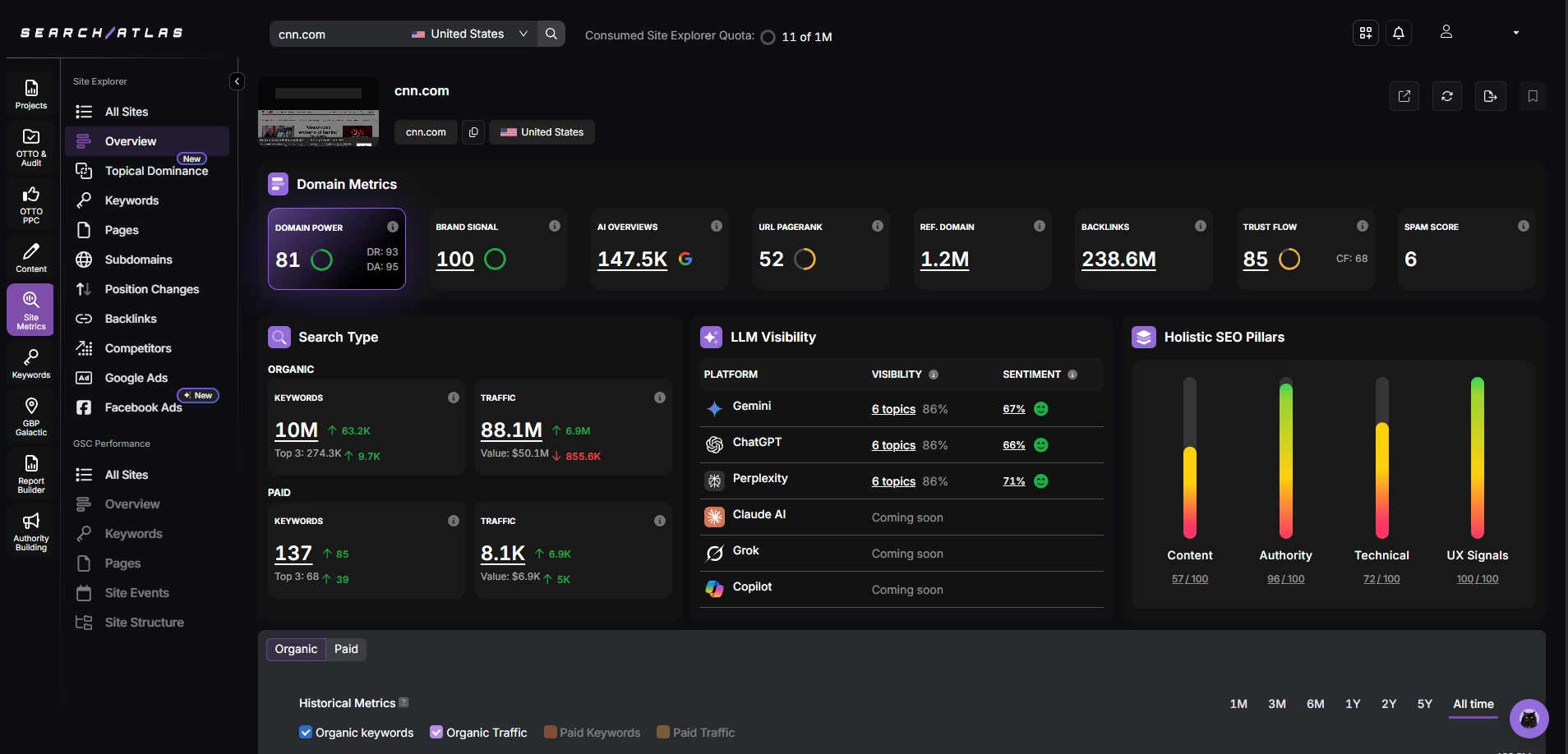
Site Explorer dashboard showing domain authority, organic keywords, traffic, backlinks, and competitor metrics

Site Explorer reveals how any website, subfolder, subdomain, or page performs. You can check AI Overviews keywords, organic or paid traffic and keywords, authority metrics, backlinks, referral domains, competitors, and more.

Get access to exclusive proprietary metrics available only on Search Atlas:

  • Domain Power™ measures true authority through rankings and traffic.
  • Topical Dominance™ maps expertise across topics or industry.
  • Brand Signal quantifies visibility and sentiment in the SERPs.
  • LLM Visibility tracks the brand’s share of voice and sentiment in AI-generated answers.
  • Holistic SEO Pillars evaluate performance across content, authority, technicals, and UX.

Site Explorer is fully connected to the Search Atlas ecosystem and transforms insights into action so you can analyze, optimize, and outperform competition without ever leaving the platform.

What You Unlock with Site Explorer

Uncover Real Domain Authority

Use Domain Power™ to measure a site’s true authority based on organic traffic and keyword rankings. Filter domains by real search visibility while still being able to check Domain Rating, Domain Authority, Trust Flow, and Citation Flow.

Analyze Topical Coverage by Theme

See how completely any site covers a subject with Topical Dominance. Spot gaps, track growth across clusters, and uncover competitors’ strengths and weaknesses to build lasting expertise.

Measure AI Exposure, Visibility and Engagement

Track brand mentions, sentiment, citation share, and visibility across search engines and AI platforms like ChatGPT, Gemini, and Perplexity for holistic insights.

Evaluate Holistic SEO Pillars

Score any website across content, authority, technicals, and UX signals to uncover strengths and gaps — guiding every SEO decision into a comprehensive strategy.

Analyze Organic and Paid Visibility

Check any website’s historic organic and paid traffic and keywords, from 1 month to 5 years, or across all time, to benchmark reach and refine strategy.

Audit Backlink Profiles Instantly

Break down backlinks and referring domains, including historical totals, backlink types and attributes, spam probability, anchor diversity, and more.

Why Other Site Metrics Tools Can’t Keep Up

Every insight is grounded in live search behavior, not estimates. Site Explorer reveals how domains rank, grow, and build authority with precision you can trust.

FeatureSearch Atlas (Site Explorer)AhrefsMajesticMozSemrush
Real Domain Authority ScoringyesDomain Power™ – ranking data + trafficnoDR (link proxy only)Trust Flow / Citation Flow (links only)noDA (link-based only)Authority Score (backlinks + some traffic, still proxy)
Topical Authority CoverageyesTopical Dominance™ (theme + depth)noKeyword-level onlyTopical Trust Flow (Limited)noLimitedTopic Research (Limited)
Branded Search & SentimentyesVisibility + sentiment in SERPsnoNonenoNonenoFresh Web Explorer (mentions only, no sentiment)noLimited (brand monitoring + sentiment, not tied to SEO)
LLM Search VisibilityyesIncluded. Tracks visibility in AI answers (ChatGPT, Gemini, etc.)noBrand Radar – (expensive enterprise add-on)nonoAI SEO Toolkit (high-cost enterprise tier)
Holistic SEO Pillar ScoringyesContent, Authority, Technical, UXnoNo combined scorenoLink-onlynoSeparate metrics onlynoSeparate metrics only
Keyword Visibility by URLyesAuto-grouped by URLnoManual checknoNot availableyesYes, via Rank TrackernoLimited (some reports, not default)
Backlink Auditing & Risk SignalsyesTrust Flow, Spam Score, follow/nofollow, anchorsStrong backlink audit (no toxicity score)Trust Flow vs. Citation Flow, topical relevancenoLimited (basic Spam Score)Backlink Audit with Toxicity Score

How to Start Exploring Real Visibility

Enter a URL and let Site Explorer surface the metrics that matter. Instantly turn any domain into a strategic SEO profile.

01
Number 01

Open Site Explorer

In your Search Atlas dashboard, go to the “Site Metrics” tab and select “Site Explorer”.

02
Number 02

Enter target domain

Paste the URL you want to analyze. Choose the input type—domain, subdomain, target page, or subfolder.

03
Number 03

Select your market

Pick the country you want to analyze. Site Explorer adapts results to reflect local search behavior.

04
Number 04

Generate your report

Click “Search” to see a complete performance dashboard with visibility, authority, link profiles, branded search, topical coverage, and more.

01
Number 01

Open Site Explorer

In your Search Atlas dashboard, go to the “Site Metrics” tab and select “Site Explorer”.

02
Number 02

Enter target domain

Paste the URL you want to analyze. Choose the input type—domain, subdomain, target page, or subfolder.

03
Number 03

Select your market

Pick the country you want to analyze. Site Explorer adapts results to reflect local search behavior.

04
Number 04

Generate your report

Click “Search” to see a complete performance dashboard with visibility, authority, link profiles, branded search, topical coverage, and more.

01
Number 01

Open Site Explorer

In your Search Atlas dashboard, go to the “Site Metrics” tab and select “Site Explorer”.

02
Number 02

Enter target domain

Paste the URL you want to analyze. Choose the input type—domain, subdomain, target page, or subfolder.

03
Number 03

Select your market

Pick the country you want to analyze. Site Explorer adapts results to reflect local search behavior.

04
Number 04

Generate your report

Click “Search” to see a complete performance dashboard with visibility, authority, link profiles, branded search, topical coverage, and more.

Who Gets the Most Out of Site Explorer

Designed for those who act first, Site Explorer transforms visibility into lasting search authority.

Growth-Focused SEOs

Benchmark against competitors, analyze keyword performance by region or product line, and prove growth over time.

Agencies Running Competitive Campaigns

Audit, analyze, and uncover opportunities to stay ahead of the competition.

In-House Marketing Teams

See exactly how your domain stacks up across regions, platforms, and competitors.

Content Strategists

Measure performance across entire topic clusters with Topical Dominance. Spot gaps and strengthen authority.

Link Builders and Outreach Specialists

Qualify link opportunities with authority metrics, each site’s topical dominance, historical organic traffic, ranking keywords, and backlinks.

Founders and Site Owners

Drop in a domain to reveal what drives visibility—and where growth is being left behind.

See the Full Search Landscape

Get a complete view of how sites, keywords, and pages perform across organic and paid search. From big-picture topical coverage to the individual URLs driving visibility, these tools reveal where opportunities exist—and where competitors are gaining ground.

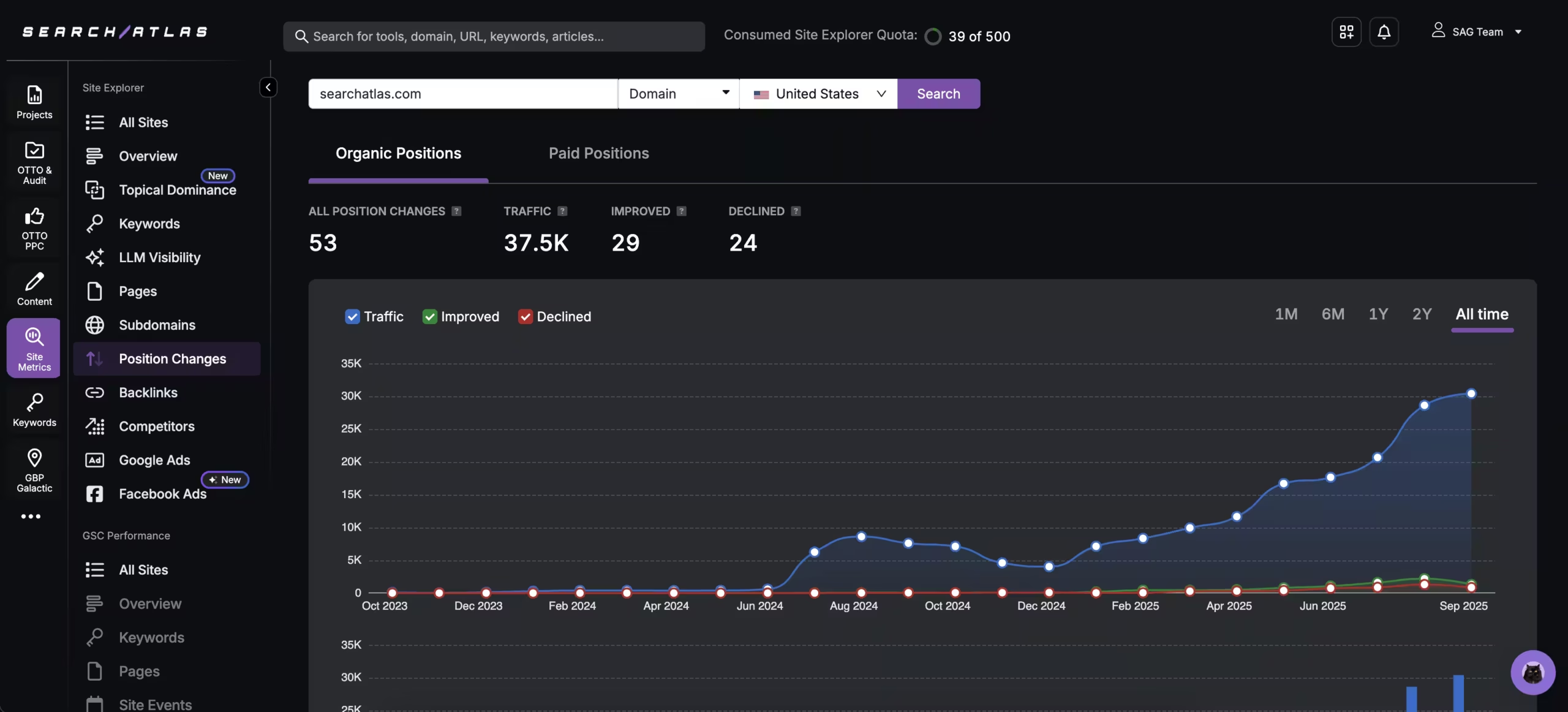
SearchAtlas Organic Positions dashboard showing traffic, improved, and declined keyword positions for searchatlas.com, with a line graph tracking growth in organic traffic from October 2023 to September 2025

Track Every Shift in Rankings

Track which competitors are rising and which are falling for both organic and paid positions. Filter results by the past month, 6 months, a year, or all time to spot short-term wins and long-term trends.

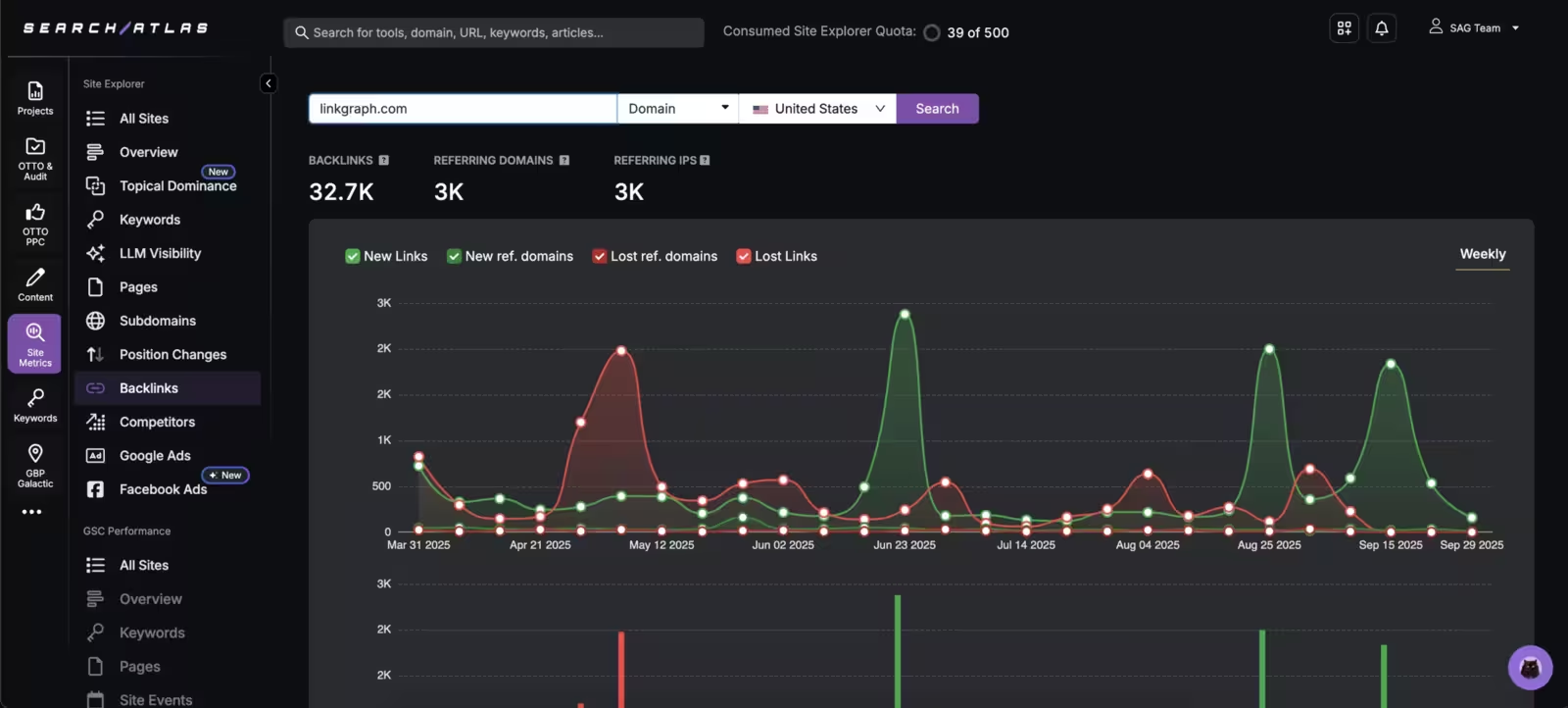
LinkGraph backlink trends analysis report

Audit New and Lost Links

Track backlinks, referring domains, and IPs—organized by type and attribute. See new links as they appear, monitor losses as they happen, and filter by active, new, or dropped signals.

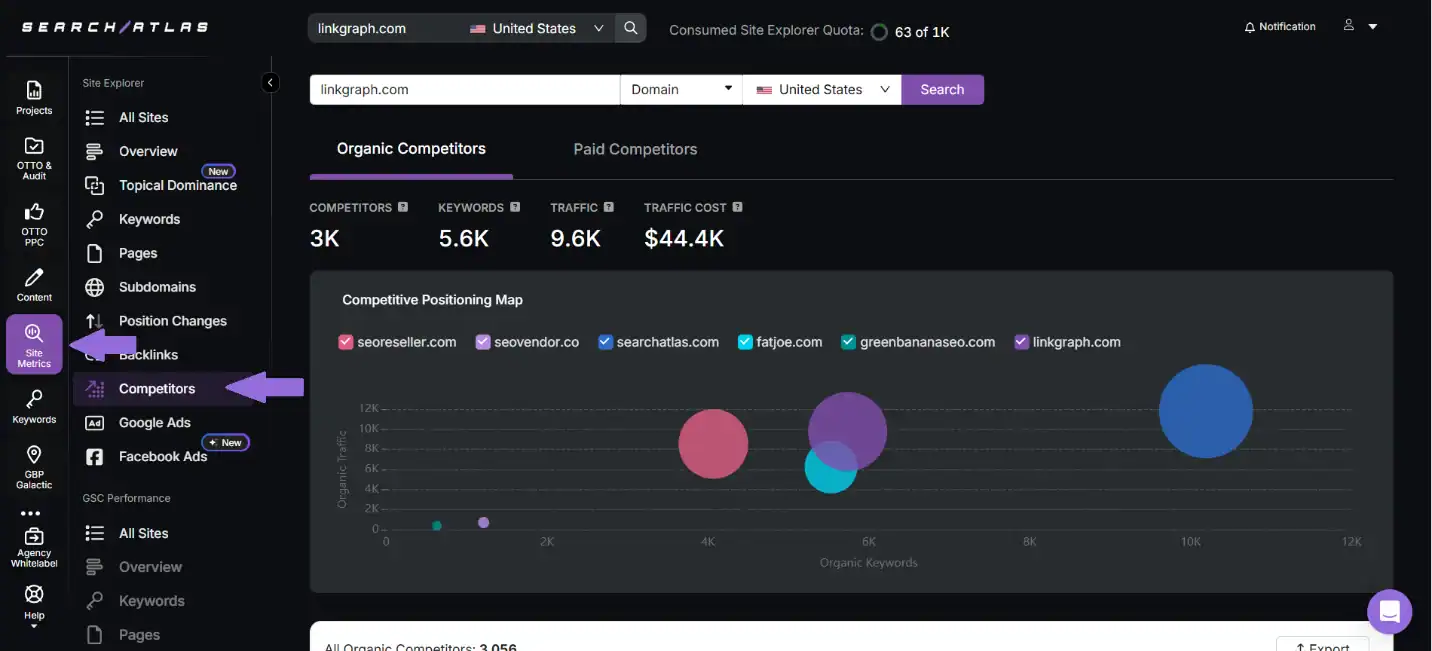
Performance SEO software dashboard showcasing competitor analysis and keyword metrics.

Uncover Each Competitor’s Rivals

Identify organic and paid rivals by keyword overlap, traffic share, and traffic cost. Visualize their position on a competitive map and reveal which domains are winning clicks in your space.

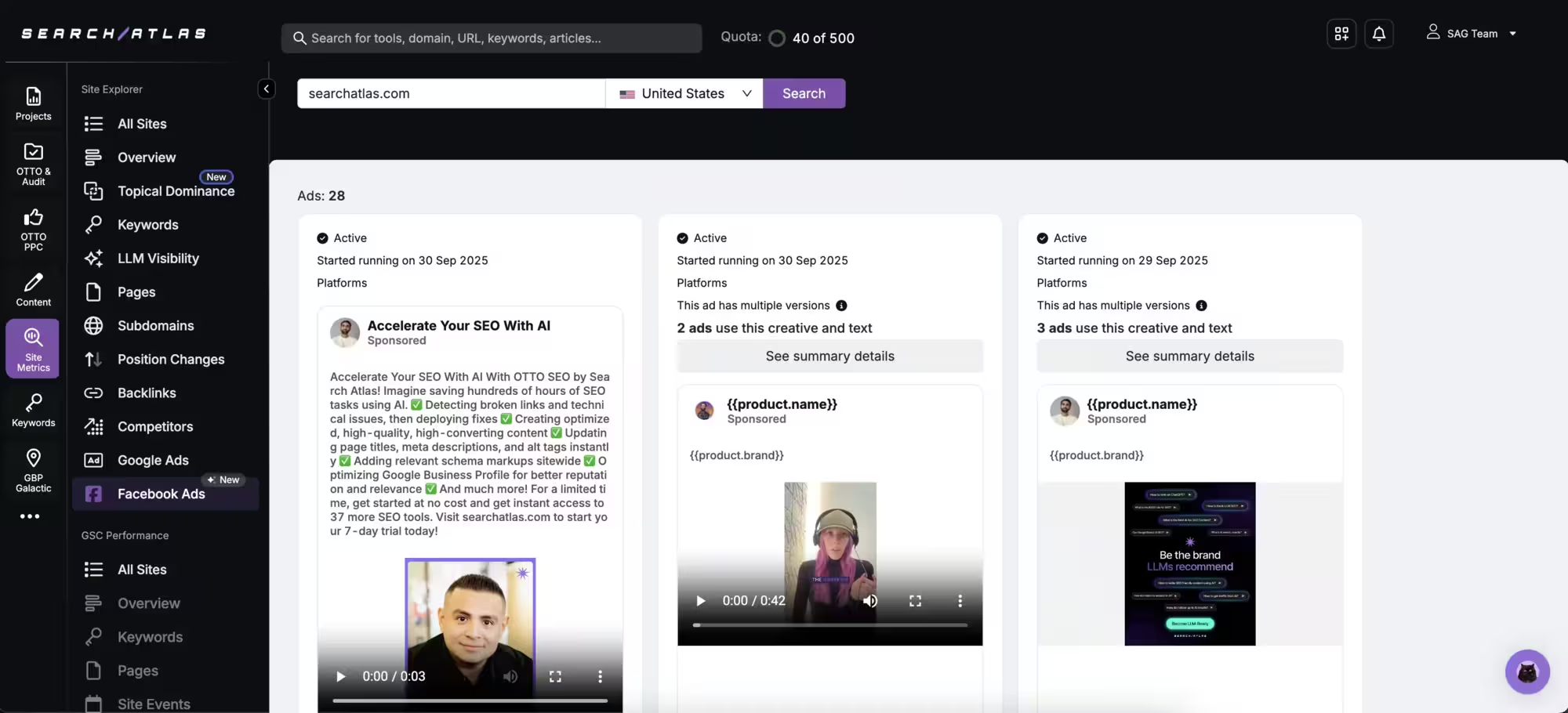
SearchAtlas Facebook Ads dashboard showing active ad campaigns for searchatlas.com, including AI-powered SEO promotion creatives and video ads launched in late September 2025

Uncover Every Competitor Ad Strategy

From current messaging to historical trends, see the ad copy competitors run across Google Ads and Facebook Ads, track changes over time, and uncover the keywords and audiences driving their ad strategies.

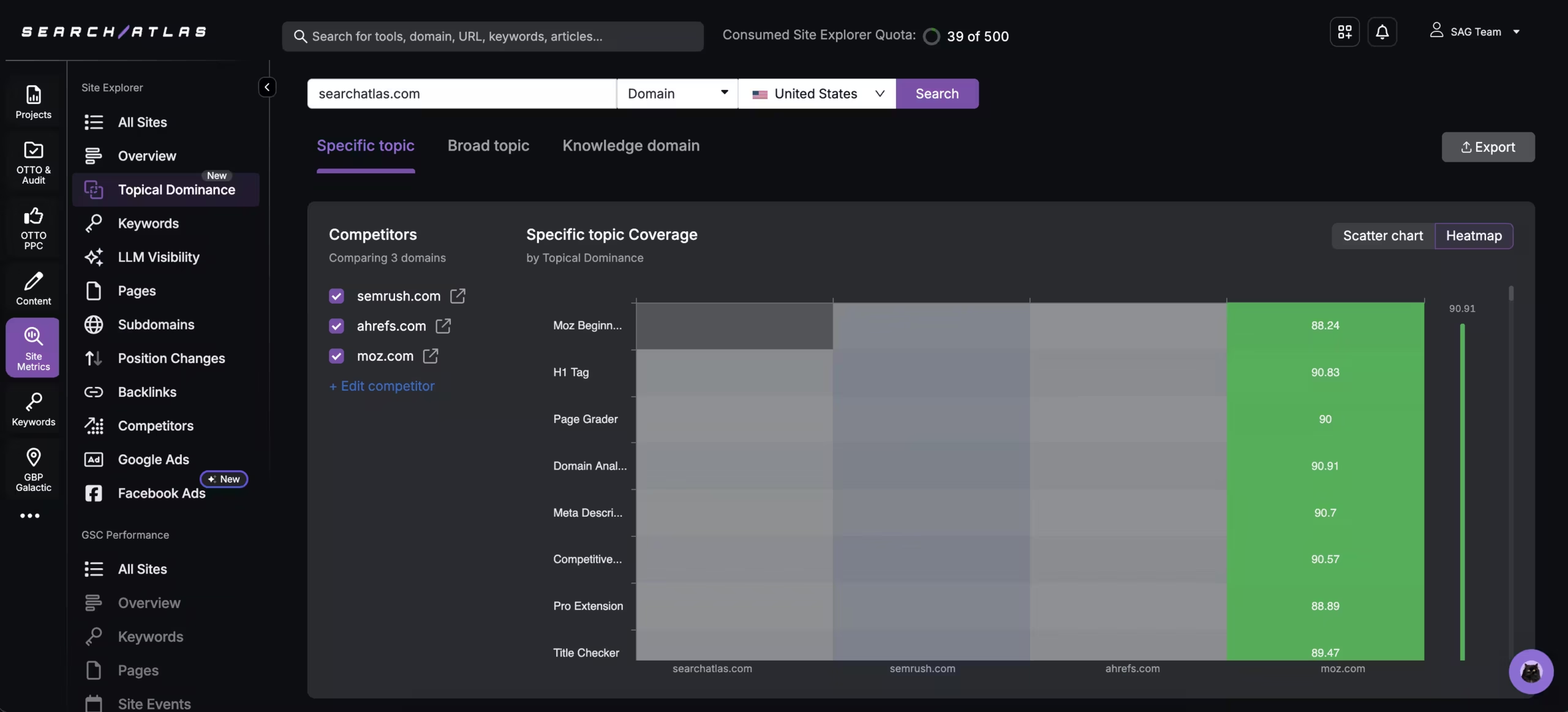
SearchAtlas Topical Dominance heatmap comparing specific topic coverage for searchatlas.com, semrush.com, ahrefs.com, and moz.com

Own the Topic, Outrank the Competition

Topical Dominance shows how fully any site covers a subject—compared to any other competitor you choose. Track coverage across specific topics, broad topics, and knowledge domains.

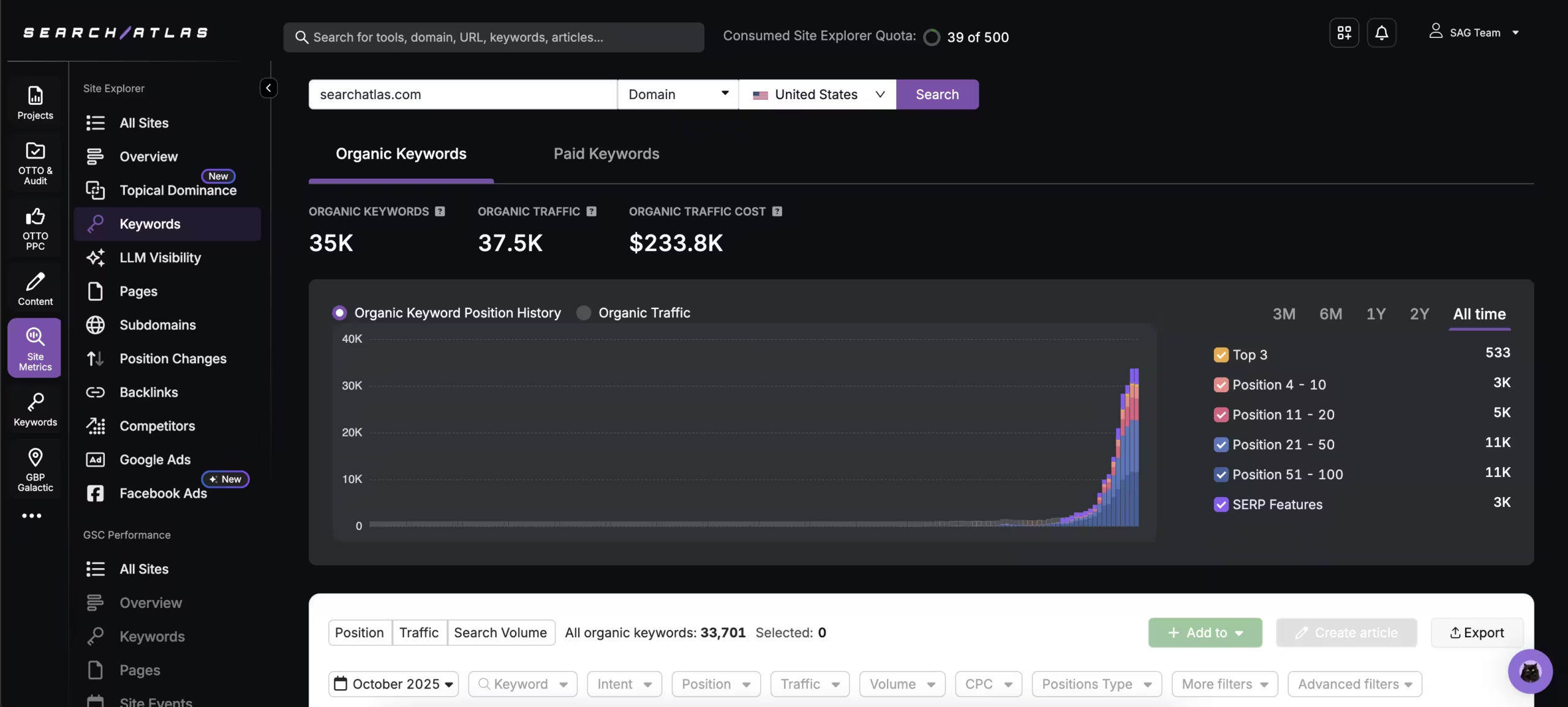
SearchAtlas organic keywords traffic analysis dashboard

Track Every Keyword. Own Every Position.

Site Explorer shows exactly how a domain ranks across organic and paid search. Monitor intent, position changes, traffic value, and SERP features—so you see where keywords drive traffic, where you’re close to ranking, and where competitors are gaining ground.

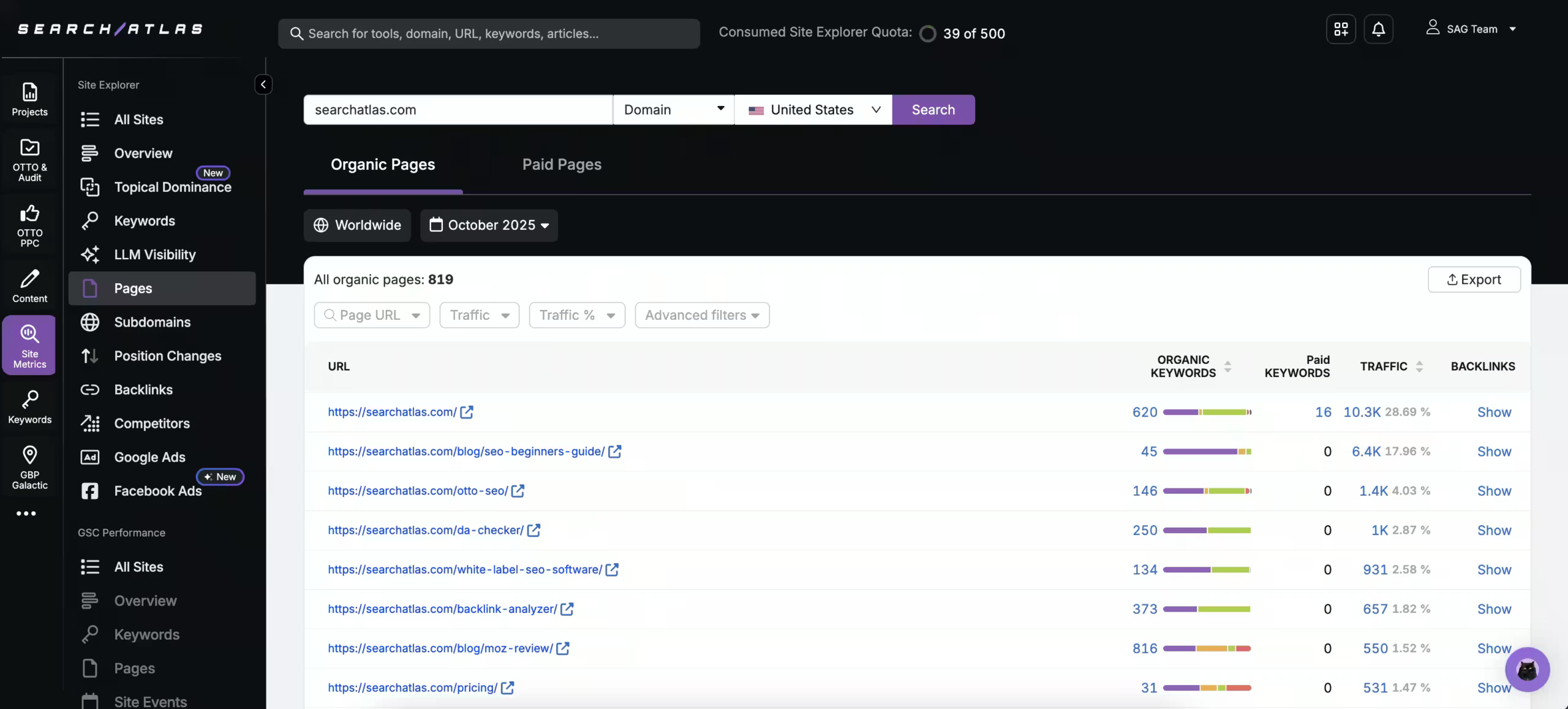
SearchAtlas Organic Pages report showing top-performing URLs for searchatlas.com with metrics including organic keywords, paid keywords, traffic, and backlinks for October 2025

See Which Pages Drive Real Visibility

Identify the URLs pulling the most traffic, keywords, and backlinks, across both organic and paid search. Spot top-performing pages and track how visibility is distributed.

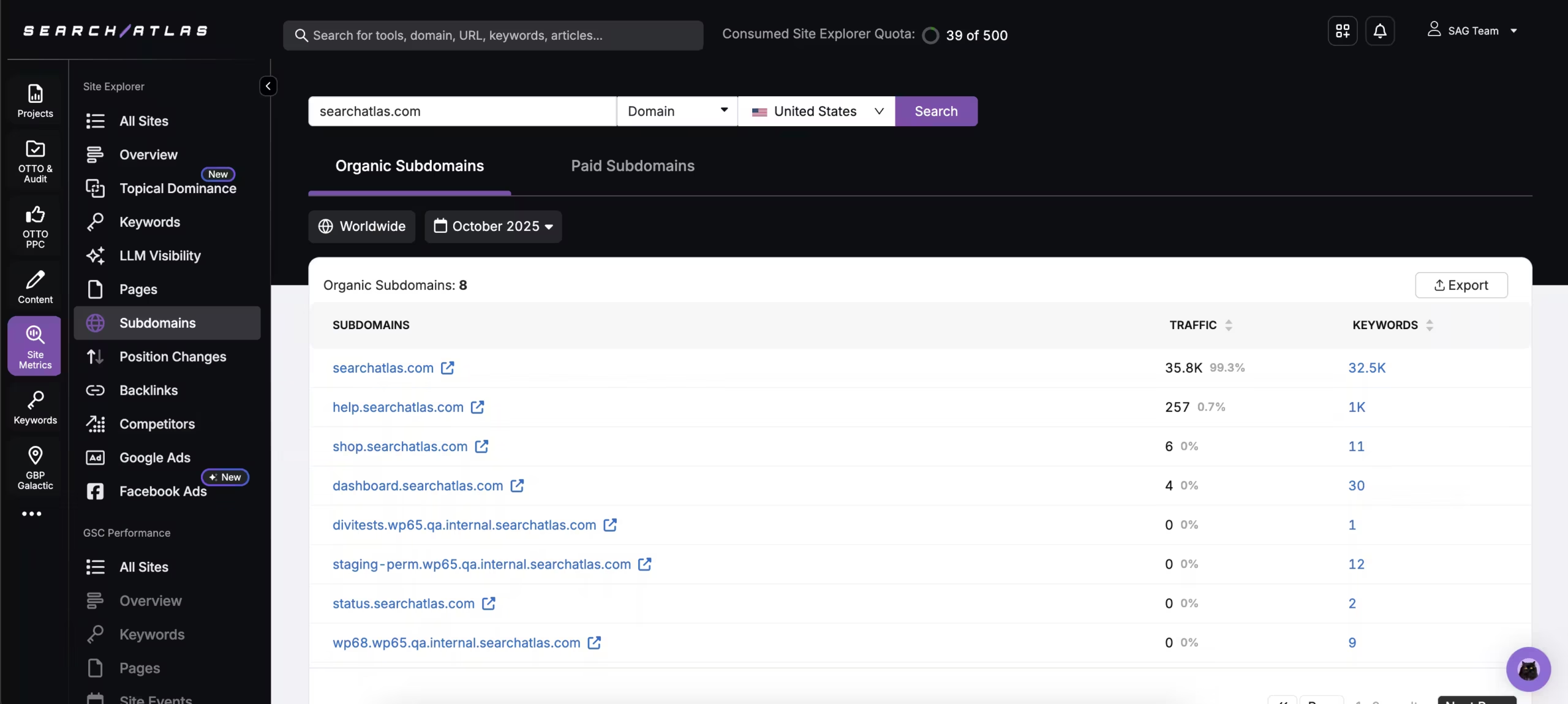
SearchAtlas organic subdomains traffic report

Break Down Performance by Subdomain

See how traffic and visibility are distributed across every subdomain. Compare strengths, uncover weak spots, and track how different areas of a site contribute to overall authority.

SearchAtlas Organic Positions dashboard showing traffic, improved, and declined keyword positions for searchatlas.com, with a line graph tracking growth in organic traffic from October 2023 to September 2025

Track Every Shift in Rankings

Track which competitors are rising and which are falling for both organic and paid positions. Filter results by the past month, 6 months, a year, or all time to spot short-term wins and long-term trends.

LinkGraph backlink trends analysis report

Audit New and Lost Links

Track backlinks, referring domains, and IPs—organized by type and attribute. See new links as they appear, monitor losses as they happen, and filter by active, new, or dropped signals.

Performance SEO software dashboard showcasing competitor analysis and keyword metrics.

Uncover Each Competitor’s Rivals

Identify organic and paid rivals by keyword overlap, traffic share, and traffic cost. Visualize their position on a competitive map and reveal which domains are winning clicks in your space.

SearchAtlas Facebook Ads dashboard showing active ad campaigns for searchatlas.com, including AI-powered SEO promotion creatives and video ads launched in late September 2025

Uncover Every Competitor Ad Strategy

From current messaging to historical trends, see the ad copy competitors run across Google Ads and Facebook Ads, track changes over time, and uncover the keywords and audiences driving their ad strategies.

SearchAtlas Topical Dominance heatmap comparing specific topic coverage for searchatlas.com, semrush.com, ahrefs.com, and moz.com

Own the Topic, Outrank the Competition

Topical Dominance shows how fully any site covers a subject—compared to any other competitor you choose. Track coverage across specific topics, broad topics, and knowledge domains.

SearchAtlas organic keywords traffic analysis dashboard

Track Every Keyword. Own Every Position.

Site Explorer shows exactly how a domain ranks across organic and paid search. Monitor intent, position changes, traffic value, and SERP features—so you see where keywords drive traffic, where you’re close to ranking, and where competitors are gaining ground.

SearchAtlas Organic Pages report showing top-performing URLs for searchatlas.com with metrics including organic keywords, paid keywords, traffic, and backlinks for October 2025

See Which Pages Drive Real Visibility

Identify the URLs pulling the most traffic, keywords, and backlinks, across both organic and paid search. Spot top-performing pages and track how visibility is distributed.

SearchAtlas organic subdomains traffic report

Break Down Performance by Subdomain

See how traffic and visibility are distributed across every subdomain. Compare strengths, uncover weak spots, and track how different areas of a site contribute to overall authority.

SearchAtlas Organic Positions dashboard showing traffic, improved, and declined keyword positions for searchatlas.com, with a line graph tracking growth in organic traffic from October 2023 to September 2025

Track Every Shift in Rankings

Track which competitors are rising and which are falling for both organic and paid positions. Filter results by the past month, 6 months, a year, or all time to spot short-term wins and long-term trends.

LinkGraph backlink trends analysis report

Audit New and Lost Links

Track backlinks, referring domains, and IPs—organized by type and attribute. See new links as they appear, monitor losses as they happen, and filter by active, new, or dropped signals.

Performance SEO software dashboard showcasing competitor analysis and keyword metrics.

Uncover Each Competitor’s Rivals

Identify organic and paid rivals by keyword overlap, traffic share, and traffic cost. Visualize their position on a competitive map and reveal which domains are winning clicks in your space.

SearchAtlas Facebook Ads dashboard showing active ad campaigns for searchatlas.com, including AI-powered SEO promotion creatives and video ads launched in late September 2025

Uncover Every Competitor Ad Strategy

From current messaging to historical trends, see the ad copy competitors run across Google Ads and Facebook Ads, track changes over time, and uncover the keywords and audiences driving their ad strategies.

SearchAtlas Topical Dominance heatmap comparing specific topic coverage for searchatlas.com, semrush.com, ahrefs.com, and moz.com

Own the Topic, Outrank the Competition

Topical Dominance shows how fully any site covers a subject—compared to any other competitor you choose. Track coverage across specific topics, broad topics, and knowledge domains.

SearchAtlas organic keywords traffic analysis dashboard

Track Every Keyword. Own Every Position.

Site Explorer shows exactly how a domain ranks across organic and paid search. Monitor intent, position changes, traffic value, and SERP features—so you see where keywords drive traffic, where you’re close to ranking, and where competitors are gaining ground.

SearchAtlas Organic Pages report showing top-performing URLs for searchatlas.com with metrics including organic keywords, paid keywords, traffic, and backlinks for October 2025

See Which Pages Drive Real Visibility

Identify the URLs pulling the most traffic, keywords, and backlinks, across both organic and paid search. Spot top-performing pages and track how visibility is distributed.

SearchAtlas organic subdomains traffic report

Break Down Performance by Subdomain

See how traffic and visibility are distributed across every subdomain. Compare strengths, uncover weak spots, and track how different areas of a site contribute to overall authority.

Frequently Asked Questions

Answers to common questions about using Site Explorer for domain, competitor, keyword, backlink, and AI visibility research.

What is Site Explorer?

Site Explorer reveals how any website, subfolder, subdomain, or page performs across organic traffic, paid traffic, keywords, authority metrics, backlinks, referral domains, competitors, AI Overviews keywords, Brand Signals, LLM Visibility, and more.

Can I analyze competitors with Site Explorer?

Yes. Enter a competitor domain, subdomain, subfolder, or page to compare visibility, keyword rankings, traffic trends, backlinks, topical coverage, and paid search activity.

What proprietary metrics are included?

Site Explorer includes Search Atlas metrics such as Domain Power™, Topical Dominance™, Brand Signals, LLM Visibility, and Holistic SEO Pillars alongside organic, paid, and backlink data.

Does Site Explorer show backlink data?

Yes. You can audit backlinks, referring domains, anchor text, link attributes, historical trends, new links, lost links, and risk signals from the same Site Explorer workflow.

Can I check a specific page or subfolder?

Yes. Site Explorer supports domain, subdomain, subfolder, and target-page analysis so teams can inspect a full site or isolate individual URLs and sections.

How does Site Explorer help SEO teams take action?

It connects competitive research to Search Atlas workflows, helping teams find keyword gaps, prioritize pages, evaluate links, monitor topics, and move from analysis into optimization without switching tools.